See TaxIntake Pro in Action
A walkthrough of the real portal — from the client's first intake to a finished return.
A Real Look at the Portal
These are real screens from TaxIntake Pro, shown with test data.
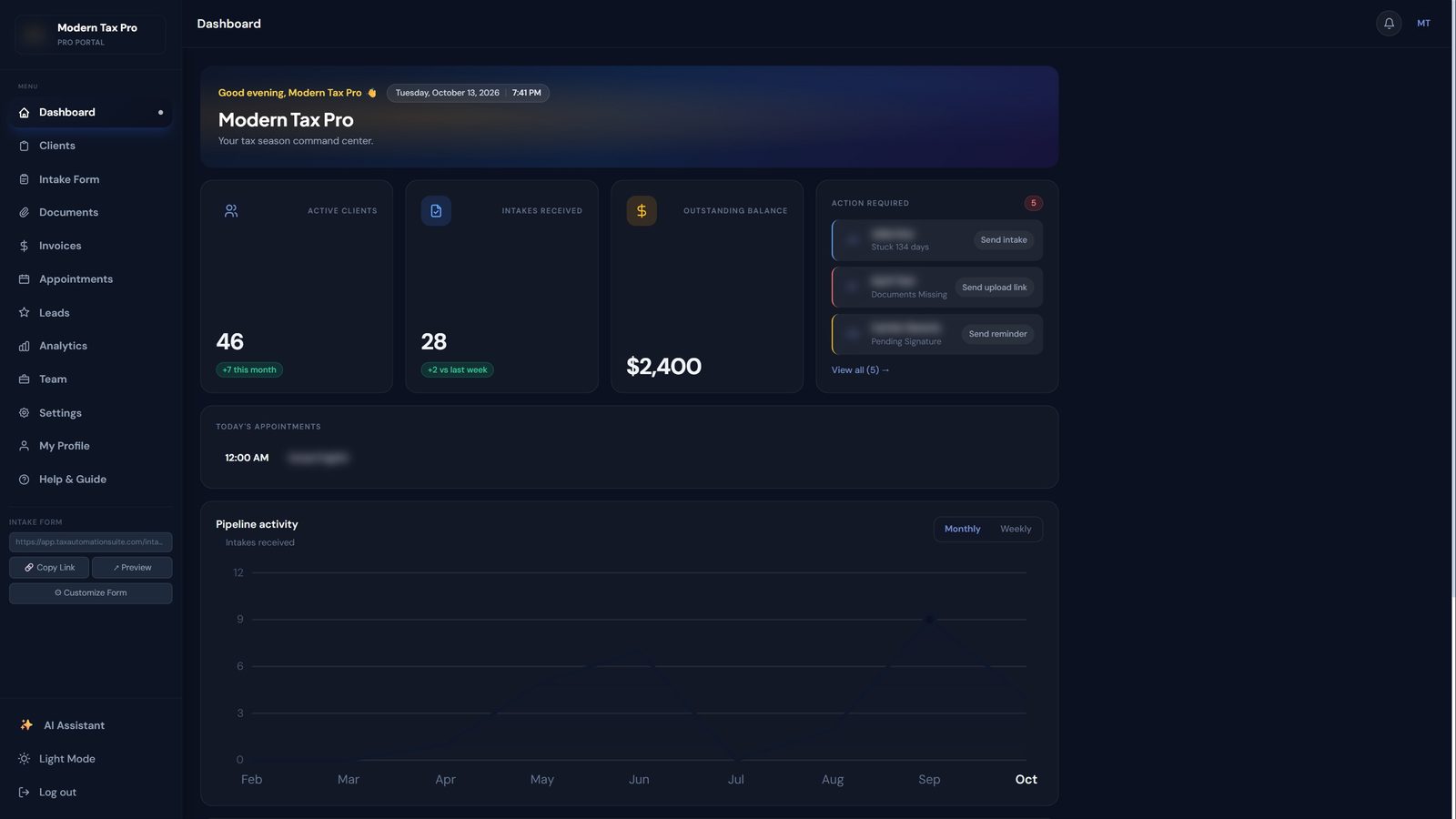
Know what needs you the moment you log in
Your whole practice on one screen, built for the middle of tax season.
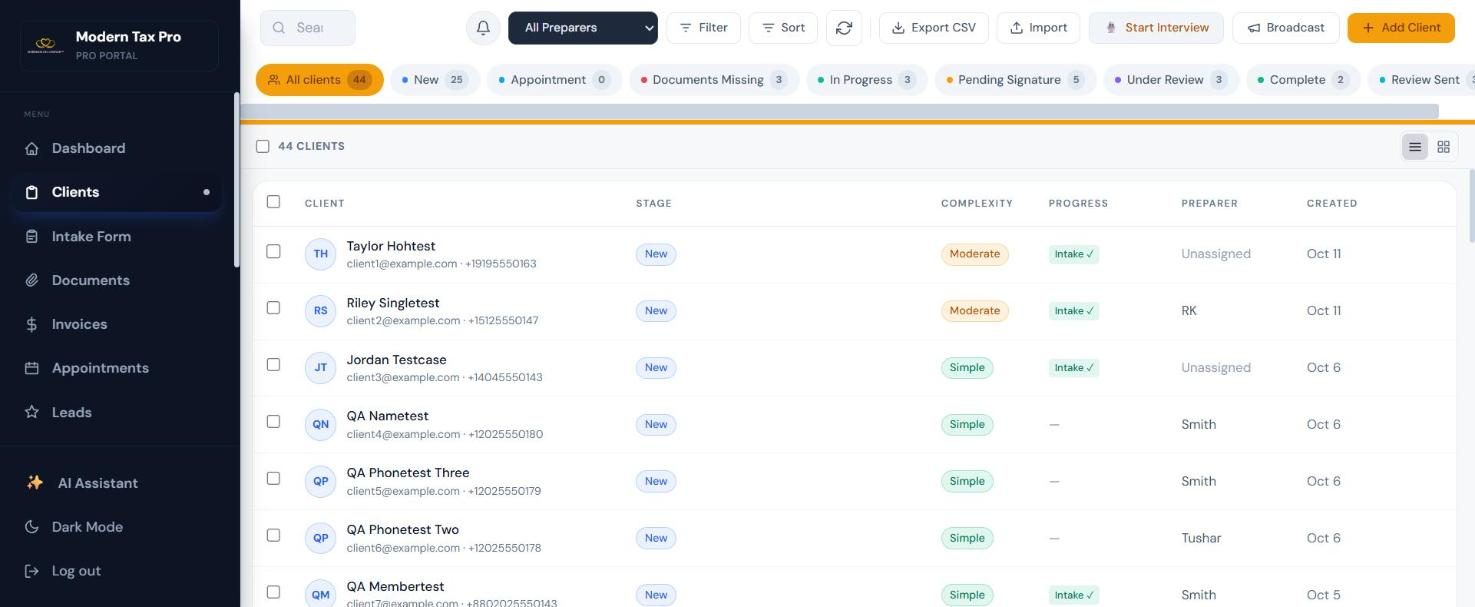
Every client, every stage, one list
Search, filter and act on your whole book of business without leaving the page.
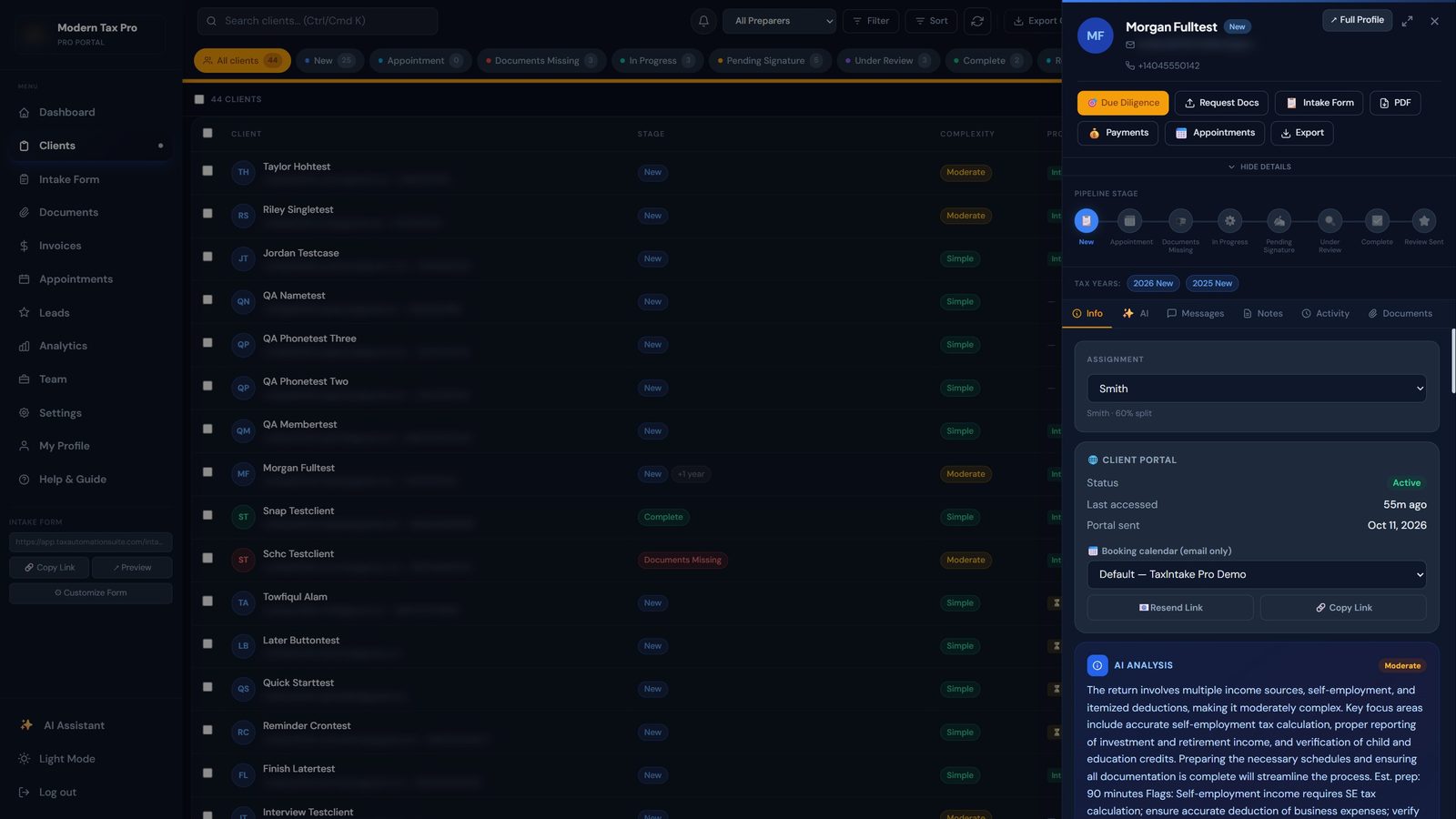
Open a client and everything is right there
Contact info, stage, portal activity, AI analysis, messages, notes and documents in one panel.
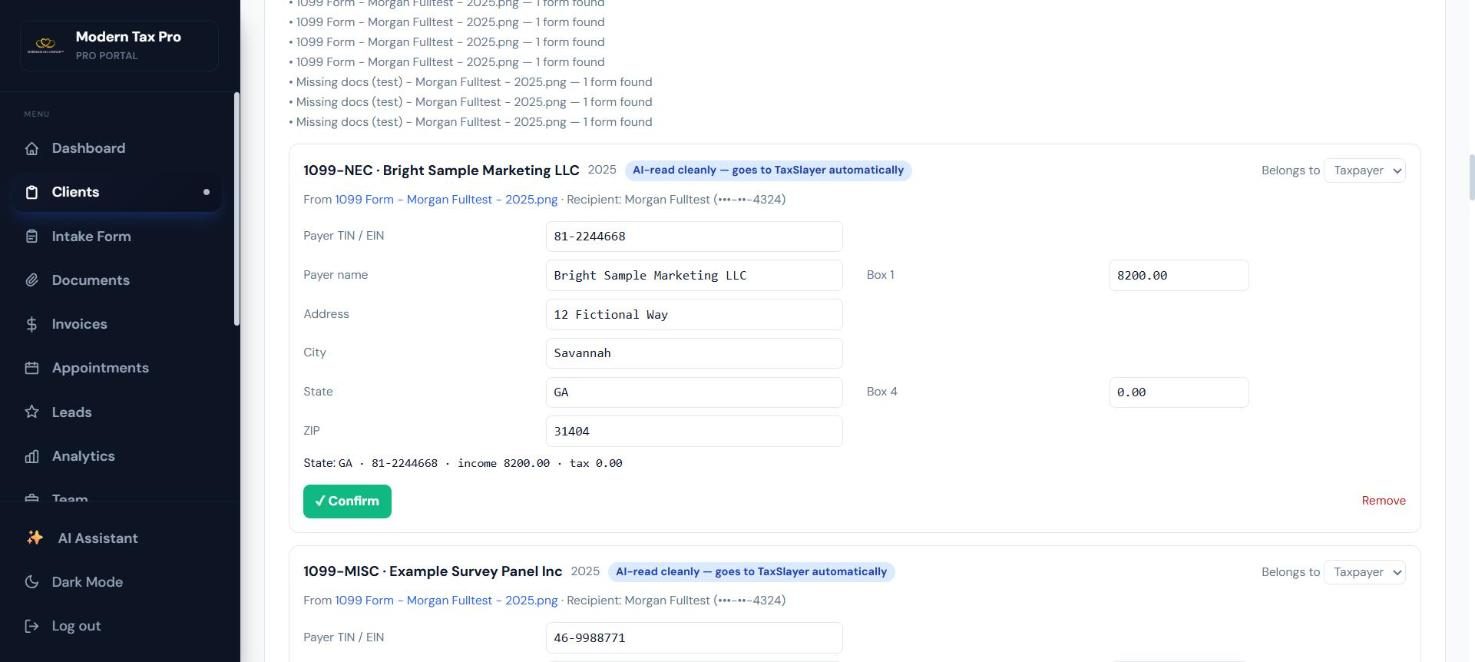
Forms are read for you — you just confirm
Clients upload a W-2 or 1099 and the boxes are extracted automatically.
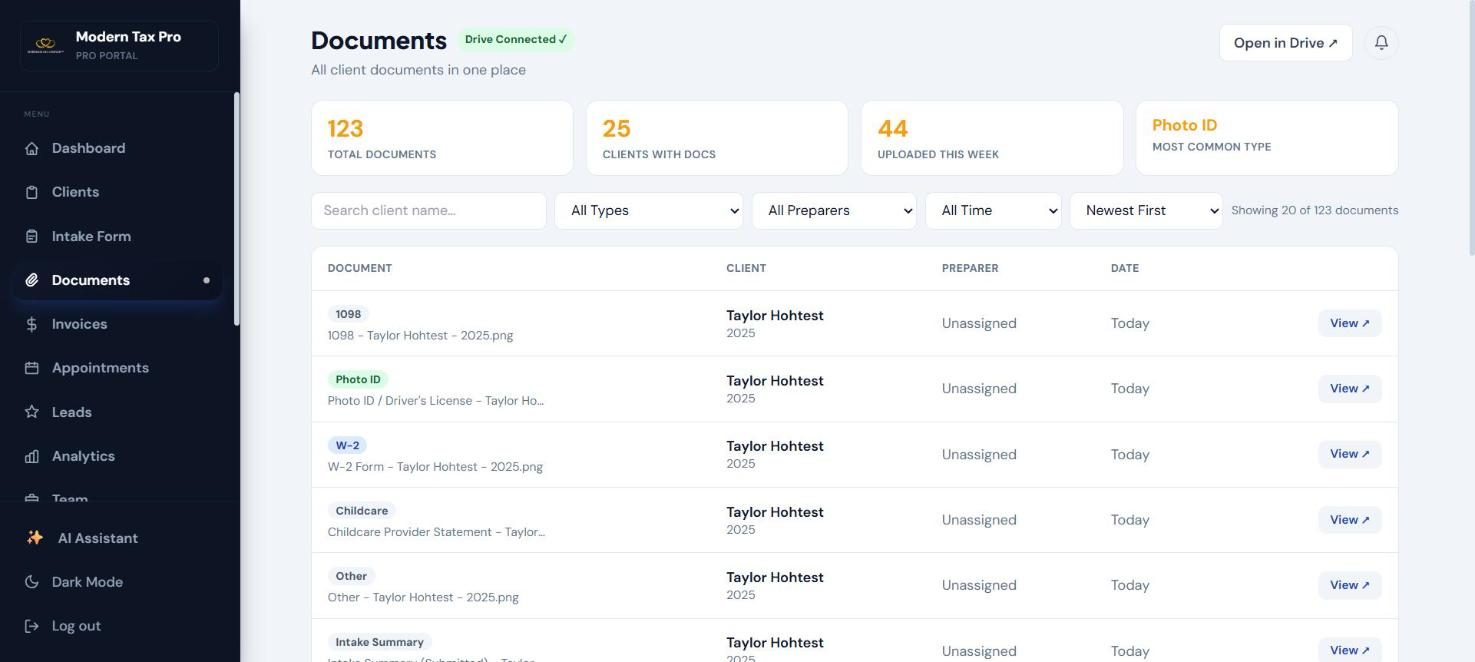
Every client document in one searchable place
Photo IDs, W-2s, 1098s and more — organized, named and synced to your Google Drive.
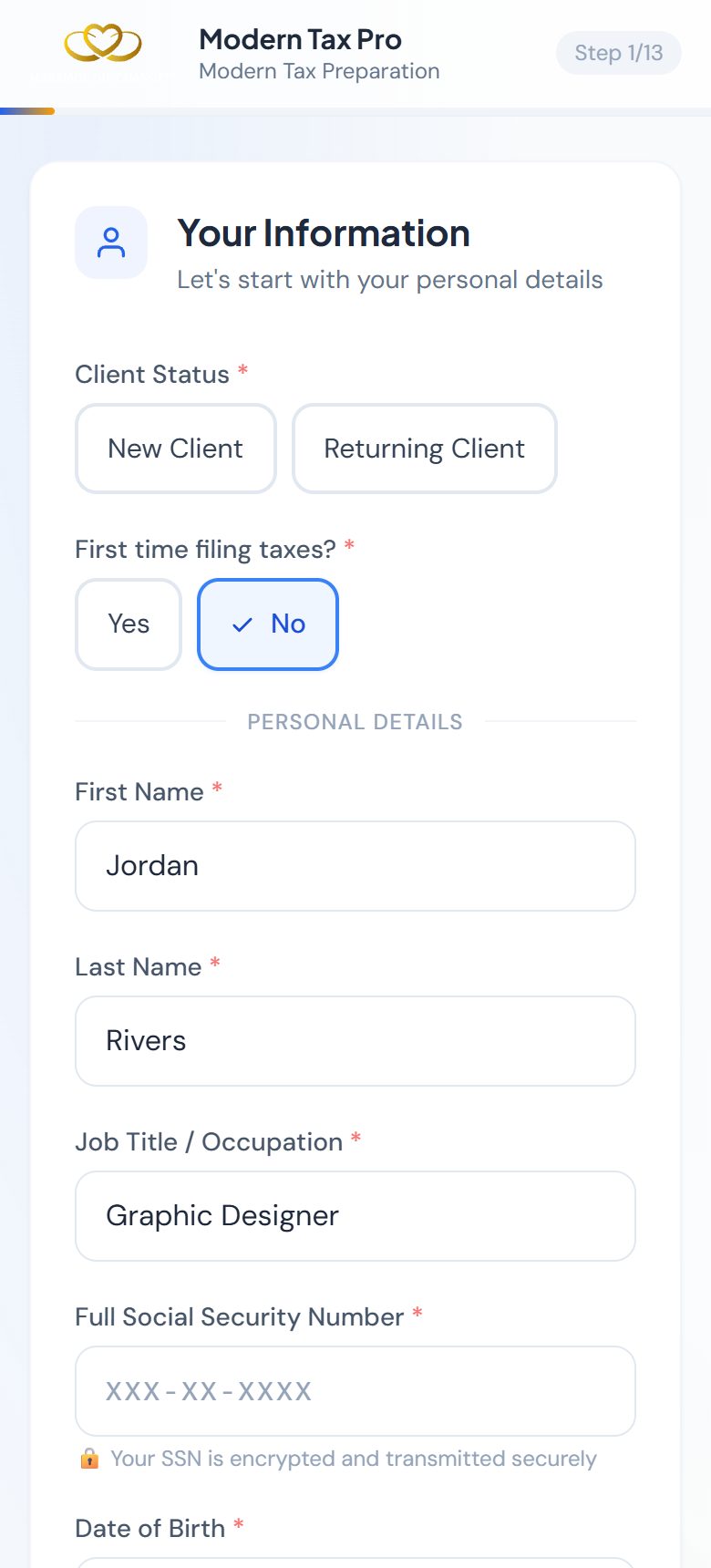
An intake your clients will actually finish
Branded with your logo, built for the phone, and one question at a time.
Built Specifically for Tax Pros
Every feature exists because tax professionals asked for it. Not a generic form tool — a complete practice management system.
13-Step Intake Form
Covers every tax scenario — W-2, 1099, self-employed, dependents, deductions. Clients complete in 5–10 min from their phone. Everything lands in GHL instantly.
Live GHL Sync
Every answer lands on the client's GHL contact automatically. Pipeline stages, tags, and your workflows trigger on every submission and status change.
Magic Link Documents
Send clients a secure link. They photograph W-2s from their phone. You get notified instantly. Documents renamed and organized automatically. No email chaos.
E-Signatures
Typed or drawn authorization signatures collected in minutes. Stage advances automatically when signed. Full audit trail logged in GHL notes.
AI Complexity Scoring
Every intake scored Simple / Moderate / Complex using AI. EITC eligibility auto-detected. Preparer brief generated. Due diligence interviews triggered automatically.
Google Drive Sync
Connect your firm's Google Drive. Documents organized: TaxIntake Pro → 2025 → Client Name → files. Named W-2 - Roman Nelson - 2025.pdf automatically.
Client Self-Service Portal
Clients track return status, upload docs, sign authorization, and message their preparer — all from their phone. Magic link access, no app download.
Messaging from Portal
Send SMS and Email straight from the client's profile. Full GHL conversation history. No switching tabs. Client replies appear in real time.
Team Management
Up to 50 team members. Each preparer gets their own filtered view, intake form link and booking link. Owner sees everything. Flexible, role-based access control.
Stop Retyping Intake Data Into Your Tax Software
Your client already told you everything in the intake and uploaded their forms. Our Chrome extension enters it into TaxSlayer Pro Online and Drake Tax Online for you — page by page, while you watch.
Pick your client
Connect the extension once from your profile. Your clients appear in a side panel next to TaxSlayer — search, click, loaded.
Answer a few questions
Before it starts, it asks only what the intake can't answer. Set your firm's usual answers once and it won't even ask.
Click Fill Whole Return
It opens each page, enters the data, saves, and moves on — showing you progress and a checklist of every page.
Review before you e-file
You get a summary of everything entered, anything flagged, and what's left for you. Submitting is always your decision.
What it enters for you
You stay in control
TaxIntake Pro is independent software and is not affiliated with or endorsed by TaxSlayer or Drake. Always review every entry before filing.
From First Contact to Filed Return
TaxIntake Pro keeps growing. Booking, AI document reading, tax-software auto-fill, lead follow-up, invoicing and more — all inside the GHL account you already use.
Auto-Fill TaxSlayer & Drake
Our Chrome extension fills TaxSlayer Pro Online and Drake Tax Online straight from the intake — personal info, dependents, W-2s, 1099s, Schedule C, credits and more. Pick a client, click once, review. It never e-files for you.
AI Document Reading
W-2s, 1099s, 1098s, 1095-As, K-1s and photo IDs are read box by box the moment a client uploads them. Anything unclear is flagged for you to check, and only reviewed forms move on.
Built-In Due Diligence
EITC, HOH, CTC and AOC due diligence interviews with risk scores and a PDF compliance record. The answers carry through to TaxSlayer's Form 8867 checklist so nothing is retyped.
Online Booking & Appointments
Clients book straight onto your GHL calendars from emails, the portal, or the thank-you screen. A new Appointment stage, firm-wide calendar view, and each preparer sees only their own bookings.
Staff Interview Mode
Sitting with a client? Fill the intake for them in the office. They get a link to review everything and sign on their own phone — it only counts as complete once they do.
Save & Finish Later
Short on time? Clients save with just a name and contact and get a link back. Friendly automatic reminders go out until they finish, then stop on their own.
Lead Follow-Up Sequences
A VIP waitlist and lead form with optional incentives, plus timed email and text follow-ups that offer a booking and the intake form — and stop the moment the lead acts.
Daily Briefing Dashboard
Open the portal to what needs you today — ready for review, waiting on signatures, documents missing — and a season-at-a-glance ribbon. Add your own firm banner.
Year-by-Year History
Every tax year is kept. Each submission is saved as a PDF snapshot and a full answer record, so returning clients never overwrite last year — and you can look back any time.
Invoices & Payments
Create and send invoices from a client's profile, record payments, and see who owes what firm-wide. Payments go through your own GHL account.
IRS Status & Filed Returns
Track accepted, processing and refund-approved separately from your own pipeline. Clients see their IRS status and can securely download their filed return from their portal.
Broadcast Messages
Send a branded email and text to all clients, or just one pipeline stage — a documents-missing nudge in two clicks, with a clear sent / skipped / failed tally.
Customize Your Intake Form
Rename, require or hide questions, add your own, show a welcome banner, and import from Jotform or Cognito. Each preparer can tighten their own version. A Schedule C business step is built in.
Team Access, Splits & Hiring
Give each member standard, partial or full access. Set revenue splits, see per-preparer performance, and recruit, onboard and sign contracts with new preparers from one Team page.
Your Brand, Your Domain
Serve the whole experience on your own web address with your logo and colors. Client emails, links and portal all carry your brand — nothing says "powered by" unless you want it to.
Instant Staff Alerts
Get notified when a client uploads, signs, messages, books or updates their info — by email, text, or browser push, per person. Alerts go only to the right preparer.
Resources & Compliance
Publish checklists and guides to every client's portal, and keep a privacy notice clients must acknowledge — with an acknowledgment rate you can see.
Up and Running in 15 Minutes
We handle all the GHL configuration. You just share your intake link.
You Sign Up
Create your account. Share your GHL credentials. We personally set up your pipeline, every intake field, and all your automation tags. You receive a Loom walkthrough showing everything working.
Client Fills Intake
Share your branded intake link. Client completes 13 steps on their phone in 5–10 minutes. All data syncs to GHL instantly — no manual entry ever.
Documents & Signature
Client uploads documents via secure magic link — photographs from their phone. Signs authorization form digitally. Stages advance automatically. You get notified.
You File Returns
AI summary ready. Documents in your Drive. GHL pipeline tracking every client. Your team working their own filtered queue. You focus on filing, not chasing.
One Tool. Solo Preparers & Growing Firms.
Solo preparer? Get organized and stop chasing clients.
Running a firm? Assign clients to preparers, track revenue splits, and give every team member their own workspace — all from one portal.
Every Document, In Its Place
Stop asking “did you send your W-2?” Connect your Google Drive once. Every document uploaded by every client — via intake form, magic link, or client portal — is automatically renamed and organized in your Drive.
Every Client Tracked. Always in Sync.
Automatic stage transitions when clients upload docs or sign. Nothing falls through the cracks.
Common Questions
What is TaxIntake Pro?
TaxIntake Pro is a tax intake software platform built natively for GoHighLevel (GHL). It provides tax professionals with a 13-step digital intake form, secure document collection via magic links, electronic signature capture, AI-powered complexity scoring, AI document reading, online appointment booking, lead follow-up sequences, invoicing, a Chrome extension that auto-fills TaxSlayer Pro Online and Drake Tax Online, and a client self-service portal. All data syncs automatically to GoHighLevel — no Zapier and nothing extra to connect.
Who uses TaxIntake Pro?
Tax preparers, enrolled agents, CPAs, and tax professionals who use GoHighLevel CRM as their primary client management system. Supports solo preparers and multi-preparer tax offices up to 50 team members.
Does TaxIntake Pro include due diligence?
Yes. IRS Form 8867 due diligence is a built-in feature of TaxIntake Pro. It conducts structured AI-powered interviews for EITC, HOH, CTC, ODC, and AOC filers, generates risk scores, and produces PDF compliance documentation.
How does TaxIntake Pro compare to TaxDome?
TaxIntake Pro is the GoHighLevel-native alternative to TaxDome. TaxIntake Pro requires an existing GoHighLevel account and stores all client data in GHL rather than a separate database.
What GoHighLevel plan is required for TaxIntake Pro?
TaxIntake Pro works with any GoHighLevel plan including white-label sub-accounts. It connects directly to your GoHighLevel account, and we handle the setup for you.